You don't need to spend heavy buck to get your system full protected. Here, we listed out a list of superb antivurs suite absolutely for free just for you!
Best free Premium Link Generator Reviewed!
Heavy downloader from file hosting site take note! If you can't afford for their Premium services here are some of the best solution for it!
ZbigZ
Unable to download torrent due to some specific reason? Have a slow connection speed? ZbigZ could be your life saviour! Save your internet bandwidth cause ZbigZ will do all the handwork for you.
Free μTorrent and BitTorrent Plus Worth $24.95
Learn how to get your own copy of μTorrent and BitTorrent Plus for free here. Grab yourself a copy of the Plus version and start enjoying the benefit instantly such as able to stream HD video. More feature list and comparison of product available on the site page.
Free Half-Life 2 and Portal Game on Steam
In this guide and tutorial we will learn how to get the exclusive Steam game of both Half-Life 2 LostCost, Half-Life 2 : Deathmatch and Portal First Slide for free in which the promotion were actually exclusively for Nvidia and ATI cardowne only.
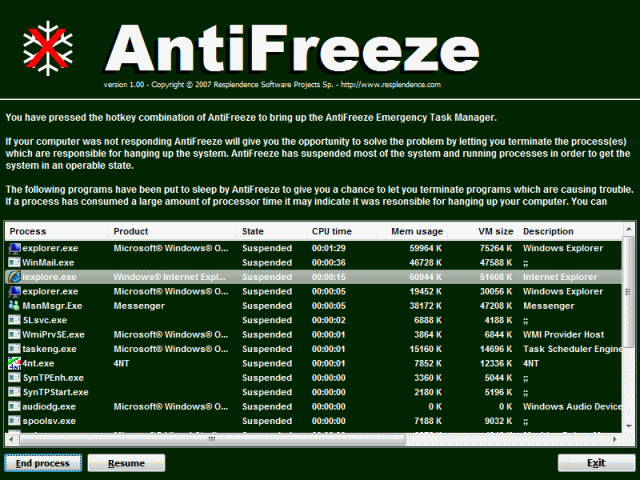
AntiFreeze offers a last recourse when you find your computer in a hung state. Because programs consume too much CPU or too much memory or too many programs have been started, your computer has become unresponsive. The mouse still moves but no programs are responding, you cannot switch to other programs or even close them. You have even tried to start the Windows Task Manager even that won’t work because it does not get enough attention from the scheduler to respond to your mouse clicks and keyboard presses. You are ready to press the reset button, instead you can press the hotkey of AntiFreeze. It will put to sleep all running programs except the most critical ones, giving you the opportunity to close down the programs which are causing problems. You may even be able to save or recover your work.
Reviewed by scout1
AntiFreeze is the 2nd last resort when your computer freeze, apart from pressing the switch of your computer's electricity source. AntiFreeze would be a much better choice than restarting your computer, as doing so would means that your work would not be saved. After freezing them, AntiFreeze pops up a task manager to allow you to remove programs that you do not need to use. After removing them, the use of CPU and RAM will be reduced, thus allowing your computer to run again. The task manager clearly shows you how much computer resources you are using, thus allowing you to carefully choose the programs you have to close. Also, it allows you to resume the programs AntiFreeze helped you to "freeze" to allow you to continue with your work.
However, if none of the programs are not needed, you probably need to go get a new and faster computer then. AntiFreeze will definitely be very useful if you are working on a big project and suddenly your computer crashed.
If you were to restart your computer by forcefully switching off the main power supply, all your work that has not been saved would be lost then, thus if you used AntiFreeze, you would be able to continue with your work and save them.
Pricing
======
Free
System Requirements
================
Windows 7/Vista/XP/2003 (x86 and x64)
The EICAR test file (official name: EICAR Standard Anti-Virus Test File) is a file, developed by the European Institute for Computer Antivirus Research, to test the response of computer antivirus (AV) programs. The rationale behind it is to allow people, companies, and AV programmers to test their software without having to use a real computer virus that could cause actual damage should the AV not respond correctly. EICAR likens the use of a live virus to test AV software to setting a fire in a trashcan to test a fire alarm, and promotes the EICAR test file as a safe alternative.
AV programmers set the EICAR string as a verified virus like any other signatures. A compliant virus scanner, when detecting the file, will respond in exactly the same manner as if it found genuinely harmful code. Its use can be more versatile than straightforward detection: a file containing the EICAR test string can be compressed or archived, and then the antivirus software can be run to see whether it can detect the test string in the compressed file.
The file is simply a text file of either 68 or 70 bytes that is a legitimate executable file called a COM file that can be run by Microsoft operating systems and some work-alikes (except for 64-bit due to 16-bit limitations), including OS/2. When executed, it will print "EICAR-STANDARD-ANTIVIRUS-TEST-FILE!" and then stop. The test string was specifically engineered to consist of ASCII human-readable characters, easily created using a standard computer keyboard. It makes use of self-modifying code to work around technical issues that this constraint makes on the execution of the test string.
EICAR file basically is a fake virus which is design to test whether an Anti-Virus is working normally as it should be on your system or not. Do not worry if in any case that your Anti-Virus failed to detect it (EICAR file) as virus because it will not do any harm to your system if it doesn't. In the scenario that if your Anti-Virus failed to detect EICAR file as thread (virus), you should really be worry because there must be something wrong with either your Anti-Virus or your system setting. Here are some factor that (might) lead to this problem and some safety measure to be taken:
-Anti-Virus are badly configured. Go to the official site of your Anti-Virus and get some support there. You might also try re-install or change your Anti-Virus software to another one as it might not be compatible to your current system.
-Your system is infected. Do a full system scan with various Anti-Virus tool/software. If problem persist, the final solution would be to reformat your system.
Setup
Here how you create the EICAR test file.
1. Launch notepad.
2. Copy the following code and paste it to the notepad
Torrific.com is a Network Transmission Provider operated by Acceleration Labs, LLC. It provides fast and reliable http Network Transmission Access to the bittorrent protocol.
Torrific.com is a site which allow user to convert torrent file into a direct (HTTP) file and retrieve them from their high speed server. The service is completely free though there are premium subscription plan which are available for $10 per month. Premium user will enjoy the following benefits:
-Retrieved torrent are placed in top priority.
-Unlimited bandwidth (free user are limited to 10GB bandwidth per day).
-No wait time even for large and huge torrent file.
This is very useful for people that are having difficulties and problem downloading files via torrent. This method will allow you to bypass the problem easily.
Here are a simply guide and tips on how to use Torrific: *Click on the image to enlarge
Copy the torrent link that you want to retrieve. Note that you don't required to download the torrent file in order to retrieve it. Simply right click on the link and copy the link address.
The torrent will appear as follow in your home page. Click on the retrieved torrent to check its status.
In the torrent status page you will be able to view the percentage of retrieved file. You will be able to download it after it is successfully retrieved to the Torrific server. This might take several hours or days depend on the size of the file. Use the email alert option to receive a notification when the file is completed so that you don't have to constantly logging into the site and check your file status.
You will then be able to download the file in direct HTTP format. The server speed is impressively fast.
Note that if the file that you retrieve are already in their server, you will be able to download it instantly. The server store retrieved file for 2 week in its cache before eventually remove it.
Pros
-Fast download speed.
-Easy and ads free page
-Absolutely free of charge
-Support download manager
Cons
-Does not support private tracker torrent. At least for now.
-Take a very long time to retrieve a huge file.
In the modern world of computing, just having one password for all your accounts is a very foolish act. If a hacker managed to get your password, all your accounts, from your banking account to your game accounts, all of them would be hacked. Thus, we have to come up with different password for each account, for more security. Unless each of your password is very easy, for example that one of your password is your mum's name, and the next is your dad's name, you would unlikely be able to remember all of them. In some cases where all your passwords are strong strength password such as "4$kdm@nd($@" , and you forget one of them, it would never be easy to remember your password, and if you cannot reset it due to some reasons, then your account is akin to have been deleted from your life. Now, why is LastPass better than other password managers, and how does it help you prevent the above situations? First LastPass is 100% free for computers(Windows,Mac,Linux,etc.). You will only need to pass $1/ Month if you are using it for your phones. Next, you do not need to download any softwares. LastPass stores your password online, so you simply need to log in and you are able to log in to all your accounts. Well, if you think that your passwords might get stolen since they are stored online, do not worry as all your passwords are encrypted, and LastPass will not enter the password if you entered a Phishing site by chance. Furthermore, LastPass has a tool to generate strong passwords for you, so you need not think of one yourself.
Well, once you have LastPass, you need not remember any of your password, and you need not type in your password, wtihout risking your password getting keylogged, hacked or phished. If you do not believe that LastPass is good, take review sites as a guide, most of them has rated LastPass as a very good product. For example, Pc Magazine has rated Last Pass with a 5/5 for AntiTheft/Password section of Security, as the Gold PC Magazine Award winner. Now, go and download lastpass now and it will be the last password you will ever need to remember!
Pricing
======
Its free but Premium plan are available which cost $1 per month. You can view and compare its plan here
System Requirements
================ Windows, Mac, Linux, Mobile
Hot MP3 Downloader is the best music downloading application for you, which can make over 100 million music available to your PC and any other portable devices such as iPod, iPhone, etc. Only 1-click, get your entire genres of complete hot music now!
Reviewed by scout1
I have tried out Hot MP3 Downloader and I definitely agree that it is the best music downloading application. Before I met this product, I have been using limewire which got closed down for legal issues, to download music files. When using limewire, I have to make sure my antivirus product is updated and is working fine, otherwise I might get some virus as the files are not tested for virus. However, Hot MP3 Downloader proved to be that there is absolutely not a file containing virus, malwares or any computer threats, thus using Hot MP3 Downloader to download music files, it is definitely safe. Unlike some music downloader products, Hot MP3 Downloader bring in all the latest music pieces, whether it got released yesterday or a few weeks ago. I can find all the music pieces I want. From hip hop songs, rock, to the 1980s classic. When using limewire, I also met a crucial problem, which is the speed. Downloading a small file can occasionally take very long like 10 minutes. Whereas, when using Hot MP3 Downloader, downloading is very fast and usually only take 2 minutes, for me. For some products, speed might mean lose in quality, however, all the music files I downloaded using this product sounded great, there was not much lose in quality. Good speed, good quality, definitely make Hot MP3 Downloader one to grab. For iPhone users like me, good thing is you download the file from Hot MP3 Downloader, you add the file into iTunes, and you will be able to immediately listen to it on your phone. There is absolutely no need to wait to convert the file as it already supports iTunes. Everyone do not like waiting, right? As you can see, everything I wrote above are the good points of the product, now lets move to the bad points of the product. When downloading music pieces, it often crashes and goes non-responding, mostly when the download is finished. So if I want to download more songs, it can be quite irritating and dreadful. Like the above I said no one like waiting, so waiting for the downloader to be responding again can be make one that is not patient, flare up. However, one can solve this by clicking download for all the music pieces he want to download and let them download slowly one by one, but if he thought of new music pieces he want to download, he would have to wait for the downloader to respond again if it goes non- responding.
Bottom Line: I would definitely recommend this to everyone. It is fast, the quality of the songs it downloaded is good and it is pretty cheap, so it is definitely a good deal for everyone! Visit them now at here!
Emsisoft Anti-Malware protects your PC from malware-based hacker attacks. Its special capabilities in dealing with trojans, worms, dialers and spyware make it an indispensable enhancement to any protection system, whether on a private PC or a company network.
The unique Malware-IDS technology in the background guard provides the first line of defense against individual attacks by highly specialized Trojans that cannot be recognized by signature-based anti-virus software. These types of Trojans are a favorite attacker tool for spying on Online Banking access data and company secrets. The Malware-IDS is also able to block Rootkits effectively.
What's new in Emsisoft Anti-Malware 6?
===========================
Scanner:
Completely re-written dual scan engine framework for multi-core optimizations.
450% speed improvement on average – with the same things being scanned.
Advanced caching for self optimizing scans – it gets faster with every scan.
New direct disk access scan mode for better rootkit detection (TDL-3, ZeroAccess, TDL-4, Sinowal).
Changed scan presets - added Rootkit scan, excluded Cookie scan.
Improved false positive handling.
Desired actions to be taken on scan completion can be set before the scan now, too.
The postfixes of infections were changed to !E1 and !E2.
New animation during active scans.
User interface simplifications for better usability.
Added loading scan engine animation in security setup wizard.
Missed scheduled scans can optionally be run on next program startup.
Realtime protection:
Significantly reduced performance impact of the file guard with smart caching.
Optimizations to strongly speed up the boot process.
Reduced false positives in real world use due to internal rating system.
File guard file extensions list can now be reset to defaults.
Internal and custom host blocker rules can be viewed more conveniently now.
Re-organized the guard tray icon menu to provide quick access to common features.
Licensing:
User accounts are no longer required. Switched to a simple key-based system.
Simplifications in license dialogs.
New referral rewards program to obtain a full version license for free by referring new users.
Get 1 month for free by referring another 1 month trial user.
Get 6 months for free by referring a buying customer.
New long term customer bonus program – renewals get 5% cheaper every year.
Improved notification when license is about to expire soon.
Each license is limited to use on one computer now.
General:
Settings can now be exported and imported by category.
Added security prompts to confirm final deletion of files, rules or logs.
Added newsletter subscription link in news area.
Improved update system for greater stability of online updates.
No more use of the registry to store settings – using ini files now.
Code cleanup and improvements to avoid potential crashes and hangs.
Simplified the setup process significantly.
Removed the trojan horse animation.
For more information of the product please visit here
Giveaway
We have one 6 month license of Emsisoft Anti-Malware 6 to be given away elusively for our reader. Contest will end on 24th of December so hurry up and share this great giveaway with your friend!
Congratulations to kitjai for winning this contest! Thank all for your participation and don't be disheartened if you did not win, there more giveaway to be won coming soon.
Subscribe to our feed for more great upcoming giveaway in the future and updates.
Microsoft is offering some giveaway exclusively for their Internet Explorer 9 browser user in this holiday. One of the giveaway is this GrooveShark Plus 1 month free subscription that are worth $6. Here how to do it.
Note : This offer are only valid and work in US only. Thus you will need a little bit of brain if you are a non-US resident.
You can either use Proxy or a VPN (Recommended to use a VPN)
For free Proxy method simply head to this site here
For VPN method, use this a Premium or free VPN service (You can get it by Google'ing around a bit). Here are some free VPN services. For Premium VPN use CyberGhost VPN. Learn how to get free 1 Month free CyberGhost Premium VPN at our Facebook page here (While promotion still available).
Now let proceed. What will you need?
-This offer s for Internet Explorer user only therefore you need to have Internet Explorer 9 installed.
-A GrooveShark free account
*If you are a US resident skip the Proxy and VPN method/steps
Go to this page with Internet Explorer browser.
http://www.beautyoftheweb.com/holiday/grooveshark
*Click on the image to enlarge
Grab the icon as shown into the taskbar.
A newly pinned-browser will be opened if you do the step as mentioned correctly
Next log-in into your free account and enjoy!
You can re-do these step to get another GrooveShark Plus but only with different account. Simply clear the browser history and cache.
